
Logging & Verbosity Levels#
Constellation comes with a powerful asynchronous logging mechanism which can transmit log messages with different verbosity levels over network to other nodes, log them locally to the command line or file, or both simultaneously. Asynchronous in this context means that the code which emits the log message is not held up by the processing of the message and its storage or transmission via network, but continues directly. This way, even many log messages of high verbosity level will not affect the performance of the code.
The verbosity can be set independently for logging to the command line and by every receiving node on the Constellation network. Only messages with a subscriber will actually be transmitted over the wire. In addition, the logging can be limited to individual topics.
See also
Details about how to implement logging can be found in the application development guide. A detailed technical description, including protocol sequence diagrams, can be found in the protocol description chapter in the framework development guide.
Verbosity Levels#
The verbosity levels have been designed to identify mistakes and implementation errors as early as possible and to provide the user with clear indications about the problem. The amount of feedback can be controlled using different verbosity levels which are inclusive, i.e. verbose levels also include messages from all levels above.
The following log levels are supported:
CRITICAL: Indicates a fatal error. For a satellite this log message typically entails an exception and a transition into the ERROR state. These log messages require immediate attention by the user.STATUS: Important information about the status of the application. Is used for low-frequency messages of high importance such as a change of state of the finite state machine.WARNING: Indicate conditions that should not occur normally and possibly lead to unexpected results. The application will however continue running without problems after a warning. A warning could for example be issued to indicate that a configuration parameter was not used and that the corresponding key might contain a typographic mistake.INFO: Information messages about regularly occurring events, intended for the user of the application.DEBUG: In-depth details about the progress of the application with details concerning data processing and communication with attached hardware. This verbosity level potentially produces a large number of messages and is mostly serving the application developers (i.e. the person implementing the specific satellite) to debug procedures.TRACE: Messages to trace the call stack or communication patterns across the framework or within a satellite. Log messages on this level contain many technical details usually catering to developers of the framework, including code location information of the log message.
Note
For normal operation of a Constellation framework it is recommended so subscribe to WARNING level and above.
Not subscribing to WARNING, STATUS or CRITICAL messages could lead to missing information on critical incidents, while
logging verbosity levels lower than INFO for an extended period of time over the network may have a considerable impact on
on the bandwidth available to e.g. transmit data.
Log Topics#
Some verbosity levels can be - no pun intended - verbose. In order to allow further filtering of messages on the sending side, Constellation implements so-called log topics. These divide the messages of each verbosity level into sections to which loggers can subscribe individually.
Log topics are appended to the verbosity level by a slash, a valid log topic would for example be WARNING/FSM. Subscribing
to this topic would cause the sender to only emit messages of verbosity level WARNING and the topic FSM, so any warning
relating to the finite state machine of the satellite.
Log topics can freely be set by the senders, and satellite implementations may add their own topics. There are, however, some standardized log topics used by the framework:
<type>: Every satellite logs implementation-specific things on a log topic which corresponds to their type. This means that theSputniksatellite, which serves as an example implementation for C++ satellites, will log anything that concerns its functionality on a topic calledSPUTNIK. Similarly, the PythonMarinersatellite would log to theMARINERtopic.OP: This log topic indicates direct action by a human operator. This log topic is typically only emitted by controller instances when e.g. a command is sent to the Constellation or a configuration file path is changed. Some user interfaces also provide a dedicated input for operators to manually send log messages to be stored in the log files.FSM: Any change of the finite state machine is logged under this topic.CTRL: This log topic comprises all control-related messages such as commands sent by controllers and received by satellites, their interpretation and the responses to the controller.MNTR: Monitoring code logs under this topic. This concerns the distribution of log messages and telemetry data as well as the reception thereof. Also subscription messages are logged under this topic.DATA: All information concerning data link communication is logged under this topic. This comprises information such as established data links or issues with opening files on target nodes.LINK: All networking-related log messages are published under this topic. This comprises, among others, satellite heartbeats and network discovery messages.UI: Anything related to user interfaces such as change of button states or the parsing of configurations are logged under this topic.
Graphical Logger#
The Observatory listener is a flexible logger for Constellation based on Qt. This logger is a pure user interface and does not provide any storage facilities or cache of log messages. Its main window is structured in three parts:
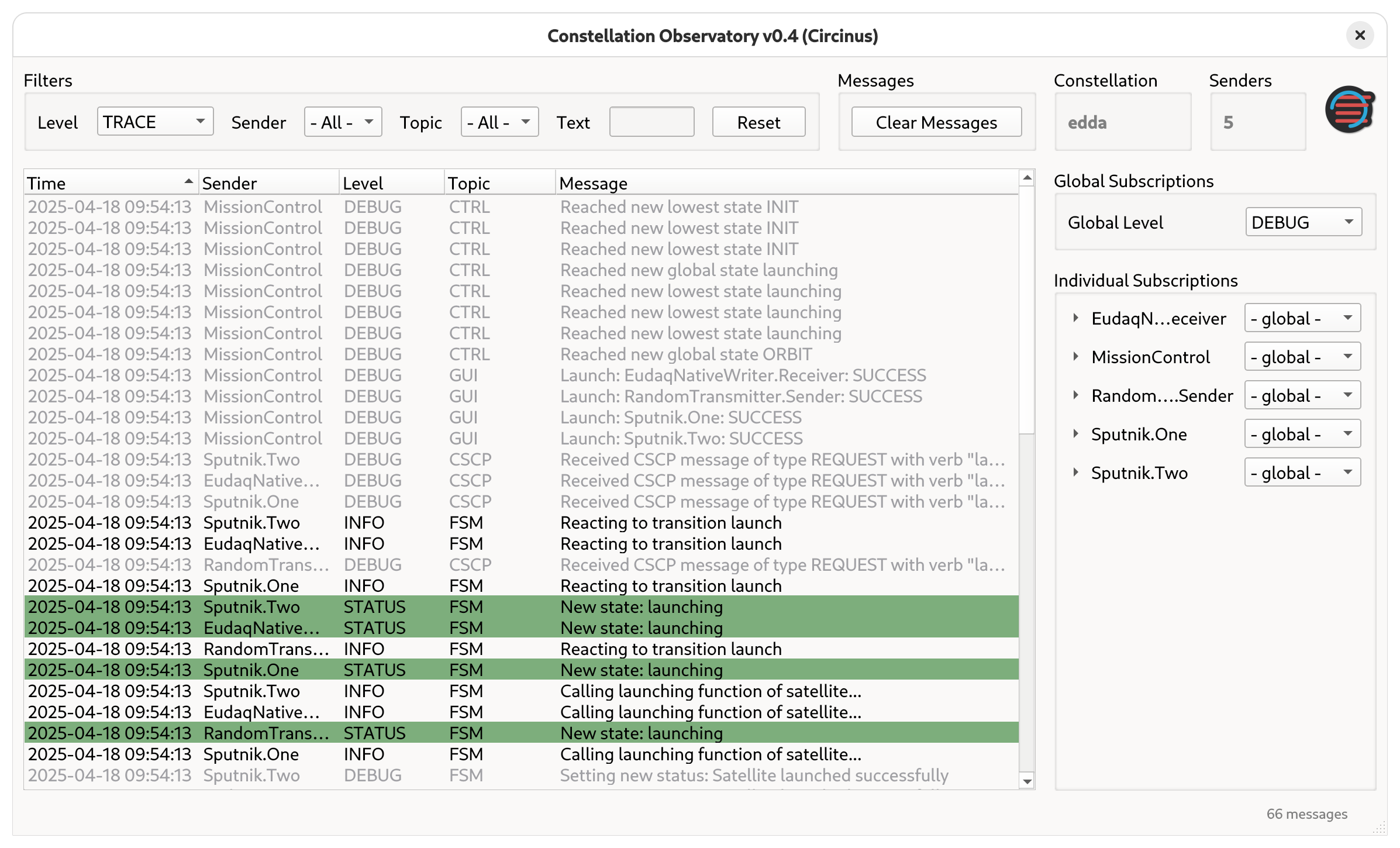
Main window of the Observatory log listener interface#
The central area of the window is occupied by the log message display. Each received message is displayed on a single line of the display, with its timestamp, sender name, log level, topic and message text, colored according to the log level severity. By default, log messages appear time-ordered with the most recent message at the top. Double-clicking a log message opens a dialog with additional information such as message tags or source code location information.
The right sidebar displays information on the Constellation along with the number of connected log senders at the top, followed by a drop-down to select the global log subscription level. Below, a list of individual log senders, such as satellites or controllers, can be found, each with their own drop-down selection for log levels. When expanding the individual senders by clicking on their name, the sender-specific list of provided log topics is shown. These settings provide fine-grained control over the subscribed log topics and determine which log messages are transmitted by the respective senders and received by the listener in addition to those subscribed via the global log level, as described in the previous section. For user convenience, the log levels function as thresholds, i.e. any subscription automatically includes all higher-severity levels.
The filter settings for received messages are located at the top of the window. With their help, the displayed list of log messages can be filtered by any combination of log level, sender name, log topic, or text matching the log message.
Note
Filtering messages does not prevent them from being transmitted over the network. For this, the corresponding subscription has to be adjusted in the right sidebar.
The status bar of the application lists the total number of received messages and indicates the number of messages received with the levels WARNING or CRITICAL.
Storage & Notifications#
In many application scenarios, keeping log messages for later inspection is an important feature. Log messages can be archived using the FlightRecorder satellite. It provides the possibility to store log messages either to a single log file or to a set of rotating log files based on their size. Alternatively, the satellite can start a new log file every 24h at a configured time, or switch to a new log file whenever a new run is started, i.e. when it received the start command. The latter can be especially helpful when many runs are recorded and an easy assignment of logs is required.
For remote monitoring of the system, Constellation comes with the Mattermost satellite which connects the logging system with Mattermost.
The satellite listens to log messages sent by other satellites and forwards them to a configured Mattermost channel.
The name of the respective satellite will be used as username to allow distinguishing them easily in the chat history.
Log messages with a level of WARNING are marked as important, messages with level CRITICAL as urgent, and both are prefixed with @channel to notify all users in the Mattermost channel.
See also
A detailed description of how to obtain a Mattermost API key and how to configure the satellite is provided in the How-To guide on Setting up a Mattermost Logger